
One stack,
many containers.
Your own container stacks built from boot, runtime and job containers — any number per type, orchestrated through a UI instead of YAML. Full control over images, volumes, configs and secrets, without ever touching Kubernetes.
Configure
instead of code.
User-friendliness is our top priority in the LAY7 cloud. While in other cloud environments you might write lengthy YAML files and manually define complex resources, everything in the LAY7 cloud is done through the UI — quickly, clearly and without errors.
Creating a container deployment takes just a few minutes. You choose the image, configure network settings, and define volumes, secrets and environment variables — all without terminals or scripting. This makes the platform particularly suitable for development teams, agencies and businesses that value fast time-to-market and easy maintenance.
All settings can be adjusted at any time and deployed with a single click. Your application stays up to date without you having to worry about infrastructure details.

Three types
for every workflow.
Container deployments consist of one or more containers that work together within a deployment. Each container has a specific task. Splitting them into dedicated types gives you a clearer structure and more flexibility.
The three supported container types — Boot, Runtime and Job — represent complex workflows without unnecessary complexity. Boot containers perform initializations, runtime containers host the application itself, and job containers can execute scheduled tasks such as backups, mailing or cleanup processes.
This way, classic web applications can be represented just as easily as microservices, APIs or automated workflows.
Boot
Run containers before your application starts — e.g. for migrating databases or setting permissions.
Runtime
The main containers of your application. They stay active and are managed directly through the deployment.
Job
Run periodically at a defined time — ideal for cron jobs, caching or maintenance scripts.
Flexibly combinable
Combine any number of container types within a deployment. Custom workflows, efficiently represented.
Smart resource
utilization.
Each container has its own performance level that can be scaled freely. This lets you precisely determine how much RAM and CPU your application has available — while keeping costs in view.
One performance level corresponds to 128 MB of RAM and 0.0625 vCPU. The fine scaling level allows both resource-saving background jobs and demanding applications to be configured optimally. Storage volumes can also be expanded in 1 GB increments.
-
A performance level represents 128 MB of RAM and 0.0625 vCPU cores. Containers can be assigned between 1 and 64 levels — thus utilizing up to 8 GB of RAM and 4 vCPUs.
-
You can adjust the performance levels of your containers at any time during operation. Storage space can also be dynamically expanded in 1 GB increments.
-
Currently, scaling is done manually, but it is particularly efficient thanks to the clear UI. Automatic scaling is planned for the future.
-
You avoid over-provisioning and use exactly the resources your app really needs. At the same time, you can respond specifically to growing demands.
Full control
over configuration.
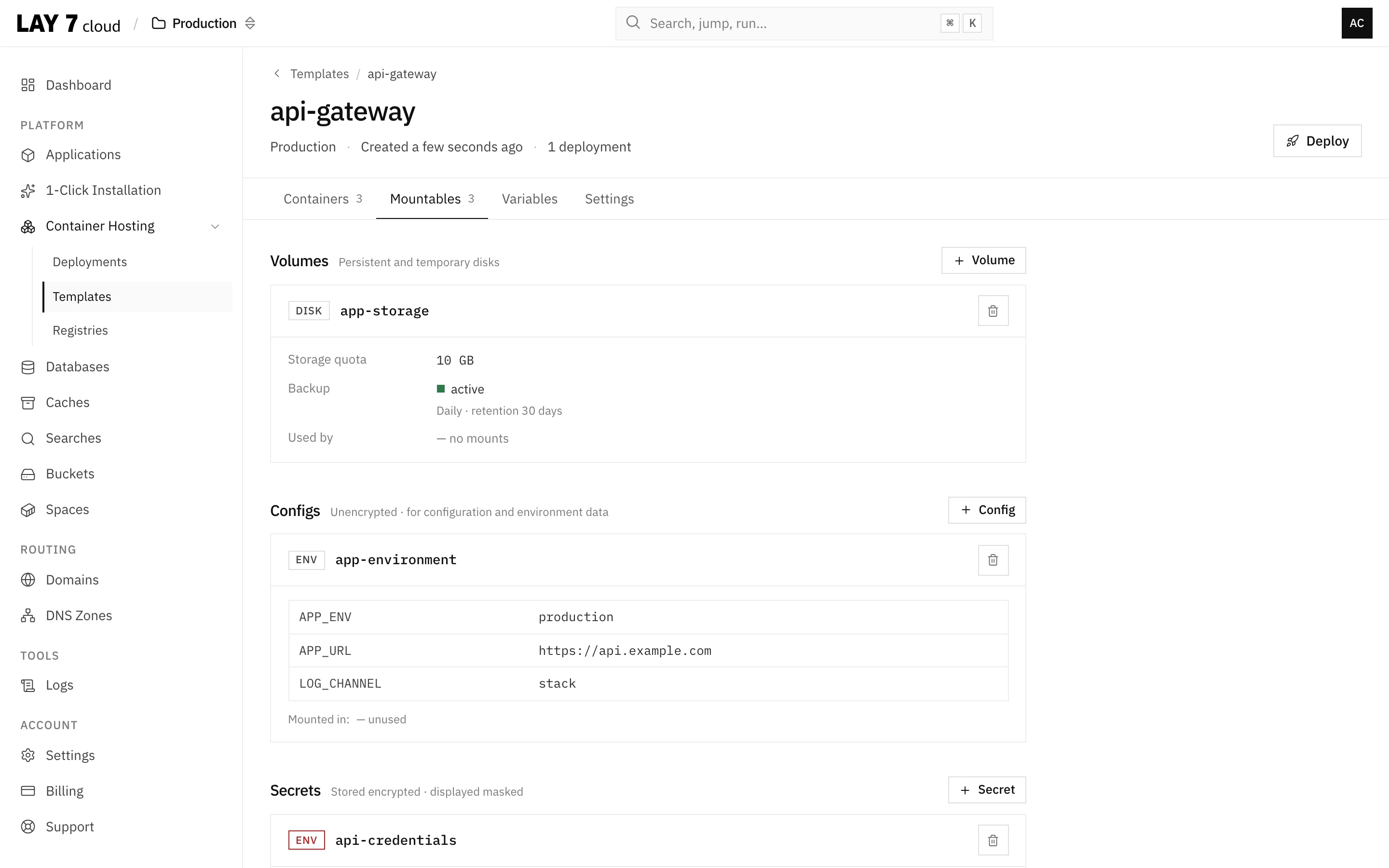
Centrally manage various resources like configuration files, environment variables, or sensitive information — for example, API keys — within the deployment.
Once created, secrets and volumes can be mounted in any container of the deployment — whether boot, runtime or job containers. This reduces redundancies and ensures a clearly understandable structure.
Your advantage: configuration management becomes easier, safer and more organized, especially as project complexity increases.
More comfort
in everyday work.
Speed and precision are essential in everyday work. That's why the LAY7 cloud provides a variety of practical tools that make your work with containers easier.
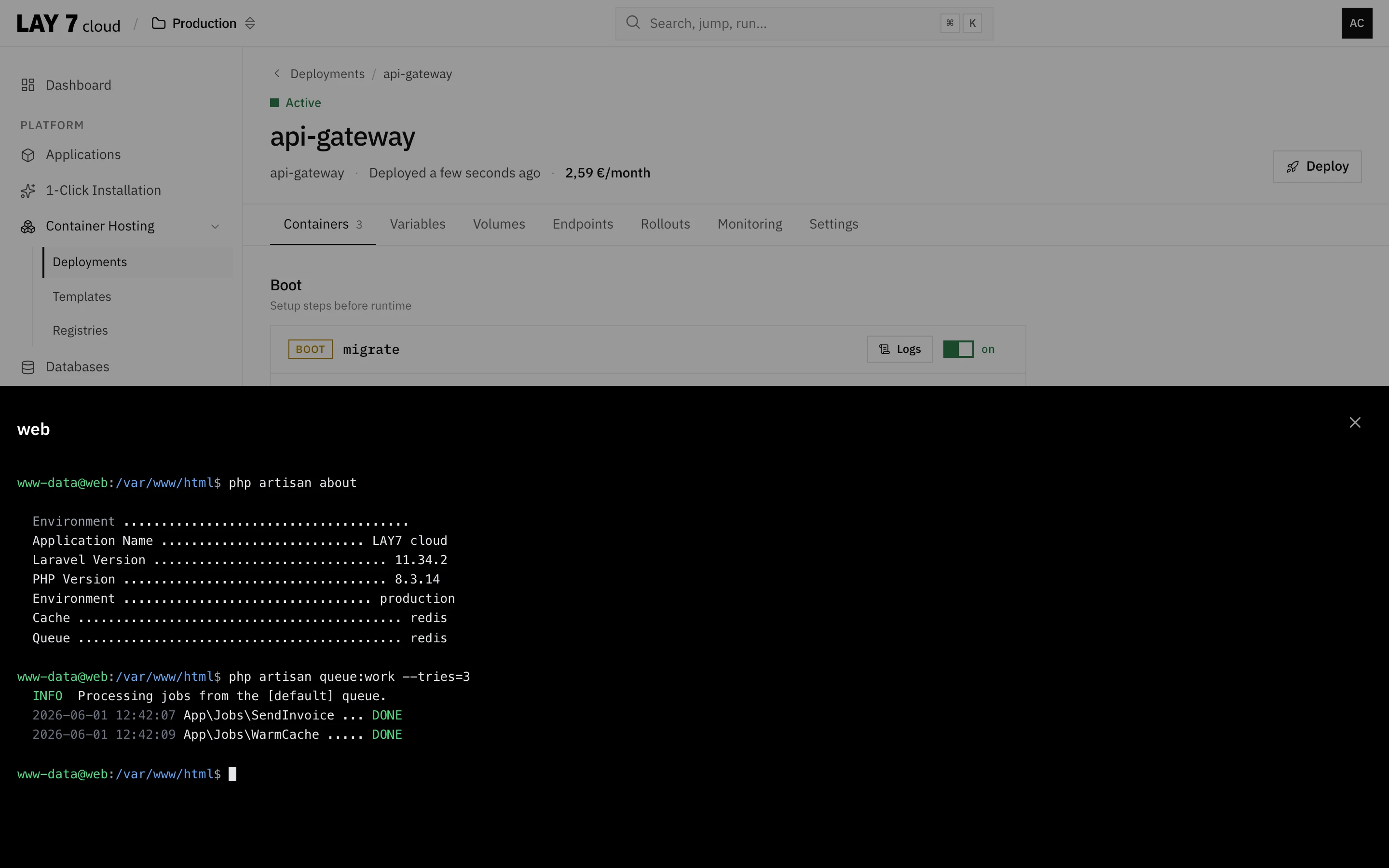
With the integrated web console, you get direct shell access to each container — live in the browser, no SSH needed. Error analysis, logs and configurations can be immediately tracked or adjusted.
Integrating your own Docker images is also incredibly easy. Set up your private registry once, and use the images across projects anytime.
Web console
Direct access to shell and logs in the browser — ideal for debugging and spontaneous adjustments.
Private registries
Your own container images from private repositories. Once connected, available globally.
Central overview
The dashboard shows all deployments, containers, resources and performance at a glance.
Live logs
Follow the logs of your containers live in the UI — quick troubleshooting without terminal.
Live access,
without VPN or SSH.
The integrated web console allows direct access to the command line of your containers — without VPN or SSH access.
Ideal for quick analyses, debugging or administrative tasks within the container. Execute commands directly in the browser and receive immediate feedback.
The access is secure, browser-based and one-click — without needing to install any additional tools.
Frequently asked
questions.
Container technology can simplify many things — but it also brings new questions for beginners. That's why we've gathered common questions and answered them in an understandable way.
If you need further assistance, our support team is always ready — of course, free of charge.
-
You can use images from public repositories (e.g. Docker Hub) or from your own private registries. The connection is made in a few steps via the UI.
-
There is no fixed limit. You decide how many containers — and which type — are sensible within a deployment.
-
Yes — using image tags, you can precisely control the versioning of your applications and roll out updates in a controlled manner.
Ready for
productive applications.
Whether you need hosting for a static website, a complex Laravel backend or a Node.js API — containers are ready for it in the LAY7 cloud. The entire infrastructure is designed for redundancy, stability and performance.
With just a few clicks, you build production-ready deployments that can be expanded or adjusted at any time. An ideal model for startups, agencies and growing companies — but also for corporate teams that need clear structures and manageable workflows.
Experience how easy cloud technology can be today — without vendor lock-in or complicated dependencies.
More from the LAY7 cloud
Containers are one building block. Spaces, managed databases and routes complete your stack.
Containers without
Kubernetes stress.
Deploy your Docker images in minutes. No YAML files, no Kubernetes knowledge required.
- Simple UI instead of YAML
- Private registries supported
- Web console included